Huntr Review (2026)
Last tested: July 2026
Quick verdict
Huntr is the tracker-first pick of the three we tested: a kanban board for your applications, a browser extension that clips any posting into it in one click — now paired with a free resume builder. The free tier tracks up to 100 jobs with unlimited base resumes and free PDF export; the AI features sit in a steep $40/month Pro tier.
Best for: A visual kanban pipeline of your applications
Not for: Unlimited AI features without the $40/mo Pro tier
What is Huntr?
Huntr is a dedicated job application tracker — a kanban board (think Trello, purpose-built for job searches) where every application is a card moving through columns like Saved, Applied, Interviewing, and Offer. A browser extension captures postings from any job site into the board without retyping.
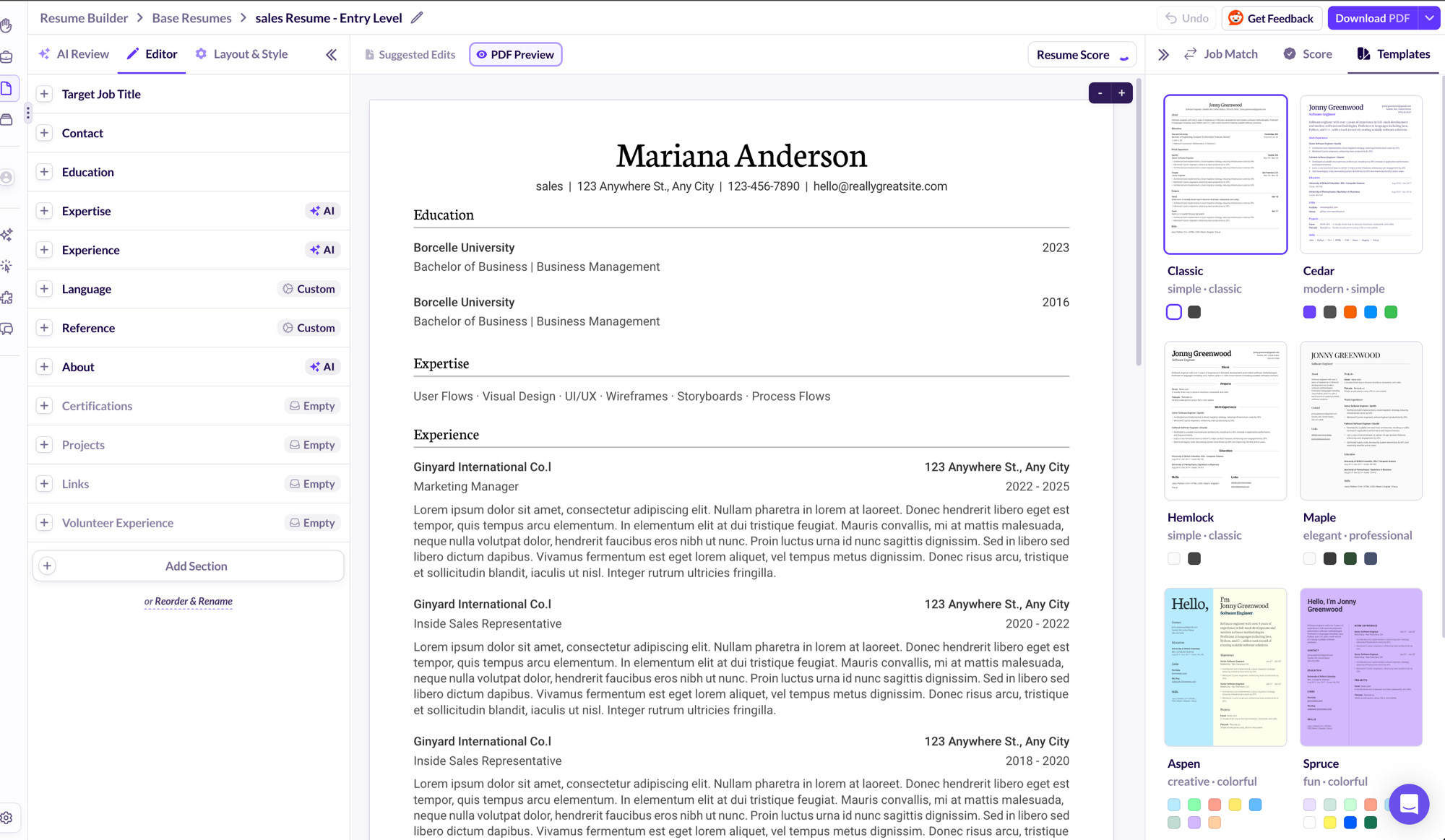
Huntr has grown beyond pure tracking: a resume builder (unlimited base resumes, free PDF export, all templates), job-tailored resume tools, and basic resume-to-job matching now sit alongside the board. The AI-powered parts — unlimited tailored resumes, AI cover letters, AI reviews — are what the $40/month Pro tier sells.
| Free plan | Track up to 100 jobs · unlimited base resumes · free PDF export |
|---|---|
| Free PDF export | Yes |
| Watermark | None |
| Credit card required | No |
| AI features | Paid |
| Starting price | Free (100-job cap) · Pro $40/mo |
| Website | huntr.co |
What we tested
We ran an active application pipeline through Huntr: captured postings with the extension, moved cards through stages, added notes, contacts, and follow-up dates, and worked against the free tier's limits. Facts were verified as of our last-tested date.
Hands-on experience
The board metaphor just works for a job search — columns for each stage, every application a card you drag forward, and the whole pipeline visible on one screen. If your search currently lives in memory and browser tabs, the first hour with Huntr is clarifying.
The browser extension is the killer feature: on any job posting, one click captures the title, company, location, and link into your board with no retyping. That capture friction is exactly what kills spreadsheet habits by week three, and Huntr removes it.
Cards hold more than status: notes from calls, contacts and their emails, salary information, documents, and follow-up dates. During interviews it doubles as a briefing document — everything about that company in one card.
Pricing and free plan reality
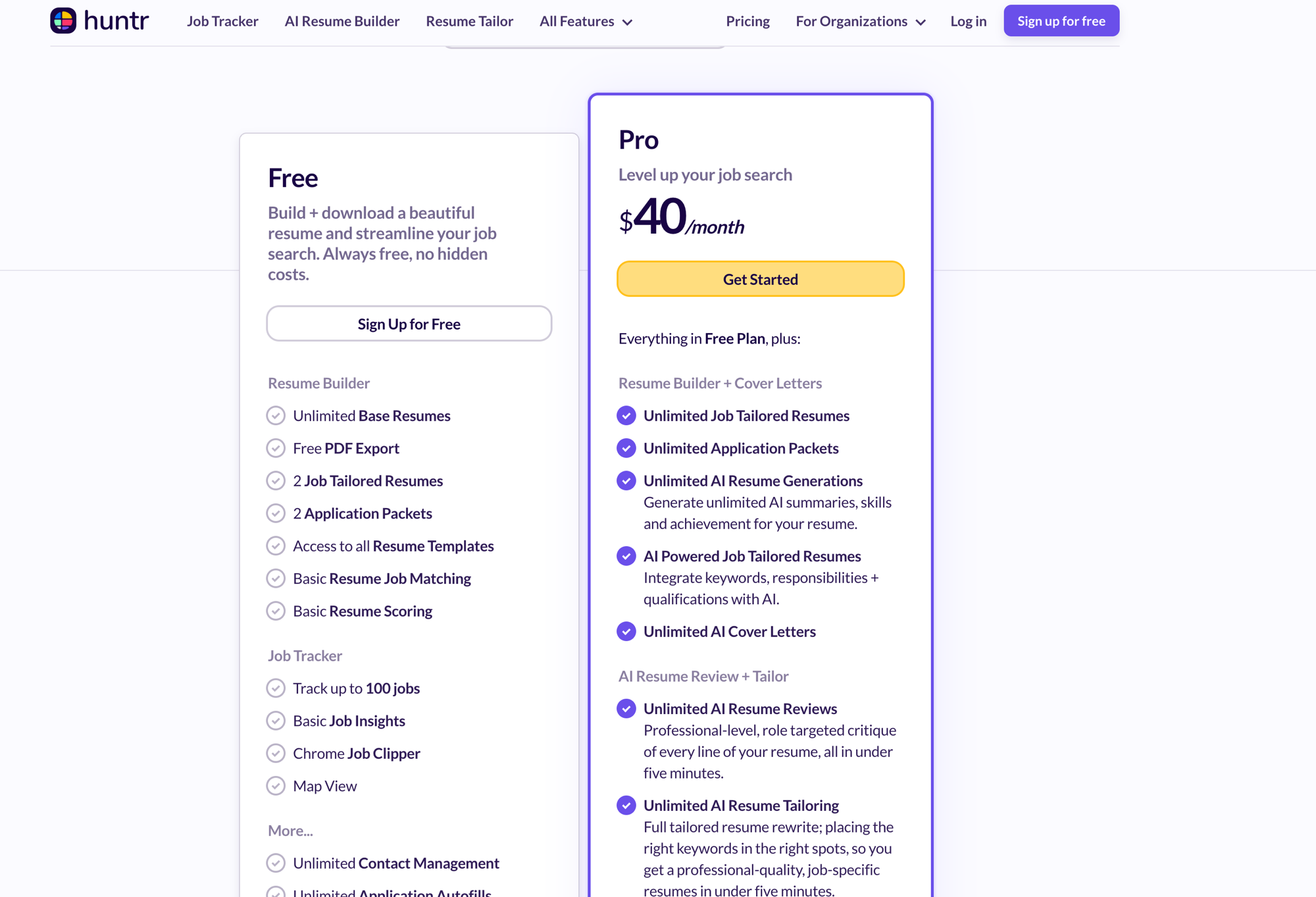
The free tier is generous on structure: track up to 100 jobs, unlimited base resumes with free PDF export, access to all resume templates, two job-tailored resumes, basic resume-to-job matching and scoring, and the Chrome Job Clipper. For most searches, 100 tracked jobs is comfortable; archive stale ones and it stretches further.
Pro is $40/month — notably pricier than the rest of this category — and buys the AI layer: unlimited job-tailored resumes and application packets, unlimited AI generations, AI cover letters, and AI resume reviews. If you don't want AI documents, the free tier is the product.
| Plan | Price | What you get |
|---|---|---|
| Free | $0 | Track up to 100 jobs · Chrome Job Clipper · unlimited base resumes · free PDF export · 2 job-tailored resumes |
| Pro | $40/mo | Unlimited job-tailored resumes & packets · unlimited AI generations, reviews & cover letters |
The resume side
Huntr's resume builder is a real inclusion, not a checkbox: unlimited base resumes, every template unlocked, free PDF export, and basic matching that scores a resume against your saved jobs. The free tier caps job-tailored versions at two, and the AI writing lives in Pro — so free Huntr is write-it-yourself with structure. If deep AI analysis per saved job matters more than board cleanliness, compare Teal, which leads with exactly that.
Who should use Huntr?
- Visual thinkers — the kanban pipeline beats any list or spreadsheet for seeing a search at a glance
- Budget-zero searchers — 100 tracked jobs plus a free resume builder covers a full search
- Focused searches — the free cap comfortably fits a deliberate, moderate-volume search
- Not for maximal-volume free use — the tracked-job cap arrives eventually
Pros and cons
Pros
- + Cleanest kanban pipeline of the trackers we tested
- + One-click job capture via browser extension
- + Cards hold notes, contacts, documents, and follow-up dates
- + Free tier needs no credit card; data exports
Cons
- − Free tier caps tracking at 100 jobs and tailored resumes at 2
- − AI features locked behind a steep $40/mo Pro tier
- − Pro is the priciest upgrade in this category
Top alternatives
- Teal — tracking plus a free resume builder and AI keyword analysis in one platform
- Simplify — automatic application logging if your bottleneck is filling forms, not tracking
Final verdict
Huntr remains board-first even as it grows document tools: the pipeline is still the cleanest of the three, and the free tier — 100 tracked jobs plus a real resume builder — covers a full search without payment. Pick it if the pipeline is your pain point; weigh the $40/month Pro carefully against cheaper AI elsewhere. If you want the tracker integrated with resume tooling, read Teal vs Huntr — and if a spreadsheet might honestly be enough for your volume, our spreadsheet vs tracker guide draws that line.
Frequently asked questions
Is Huntr free?
The free tier is substantial: track up to 100 jobs, the Chrome Job Clipper, unlimited base resumes with free PDF export, and basic resume-to-job matching — no credit card required. Pro ($40/month) adds unlimited AI-tailored documents.
What makes Huntr different from a spreadsheet?
One-click capture from any job posting, drag-and-drop stages, and per-application notes, contacts, and reminders — the manual-entry overhead that makes spreadsheets rot mid-search mostly disappears.
Does Huntr build resumes?
Yes — Huntr includes a resume builder with unlimited base resumes, all templates, and free PDF export. Job-tailored versions are capped at two on the free tier, and AI-powered tailoring is part of Pro ($40/month).
Can I export my data from Huntr?
Yes — your tracked search data is exportable, so your application history isn't locked into the platform.
What happens when I hit the free tier's 100-job cap?
Archive older cards to free space — dead applications don't need active slots. If you're genuinely running more than 100 live applications, evaluate whether Pro's AI document tools ($40/month) fit your workflow too.
This review follows our published testing methodology — real signups, tested free plans, and export checks — under our editorial policy. Facts current as of the last-tested date; tell us if something changed.