Teal Review (2026)
Last tested: April 2026
Quick verdict
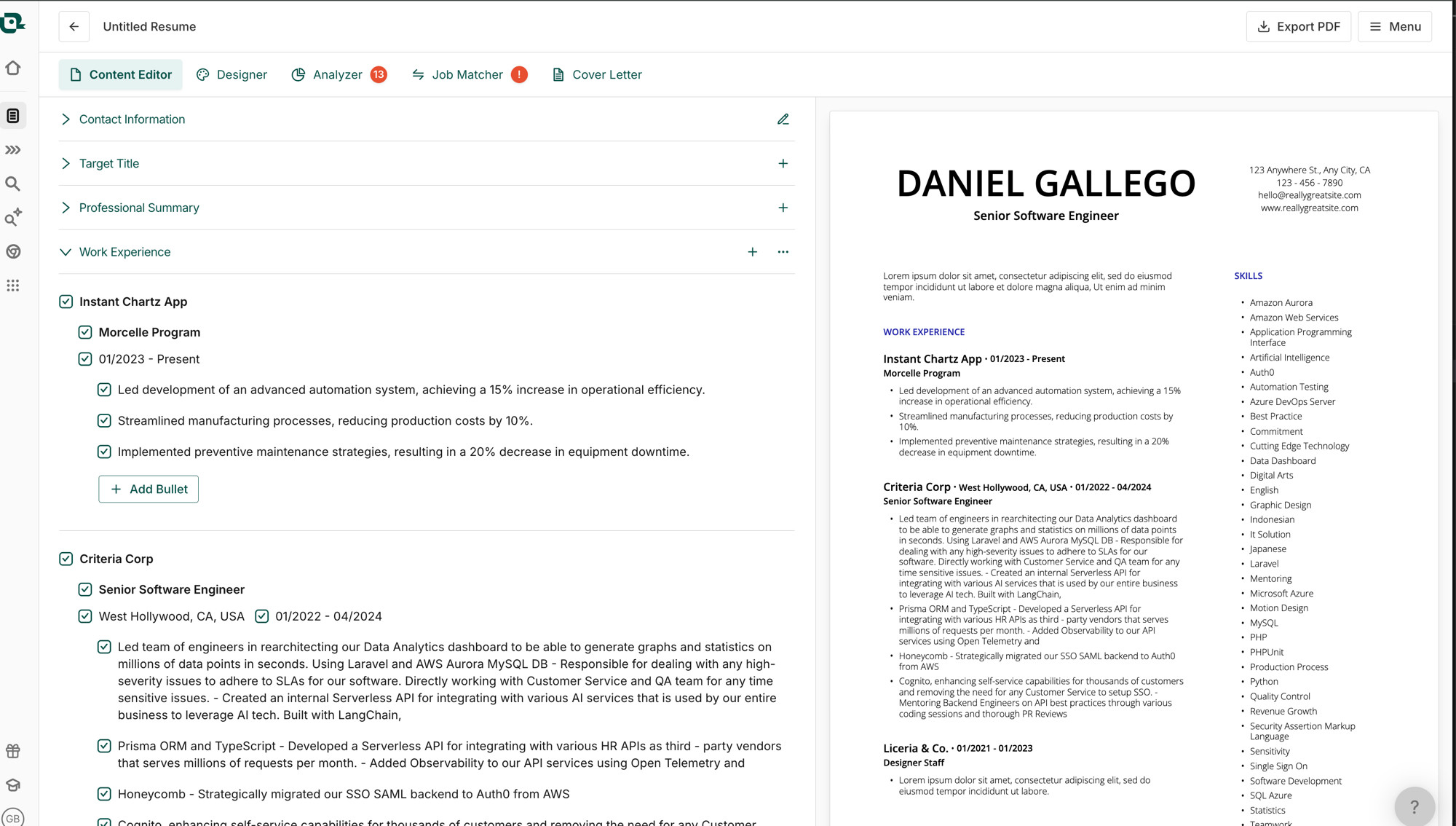
Teal is the strongest all-in-one of the trackers we tested: a real kanban-style job tracker, a free resume builder with PDF export, and AI analysis that scores your resume against saved jobs. The free tier is genuinely useful; the catch is usage caps on the AI and a premium priced weekly ($9/week) that adds up fast if you keep it on.
Best for: Light AI feedback plus job tracking in one place
Not for: Heavy AI use on the free plan
What is Teal?
Teal is a job-search platform rather than a single tool: a job application tracker, a resume builder, and AI analysis living in one account. Its thesis is that those pieces belong together — when the tracker knows which jobs you've saved and the builder knows your resume, the platform can score you against each posting and tell you what to fix.
The free tier includes working versions of all three pieces with usage caps on the AI. Teal+ removes the caps and adds advanced features, billed weekly — a pricing quirk worth understanding before you subscribe.
| Free plan | Resume builder with PDF export; AI analysis with usage caps |
|---|---|
| Free PDF export | Yes |
| Watermark | None |
| Credit card required | No |
| AI features | Limited |
| Starting price | Free (limits) · Teal+ from $9/wk |
| Website | tealhq.com |
What we tested
We ran a tracked job search through Teal: saved jobs with the browser extension, moved them through pipeline stages, built and exported a resume, and ran the AI keyword analysis until we hit the free-tier caps. Facts were verified as of our last-tested date.
Hands-on experience
Teal's core loop is good: the browser extension clips a job posting into your board in one click, the pipeline stages map naturally onto a real search, and having your resume builder inside the same tool means the AI can score your resume against each saved job — that's the feature that separates it from plain trackers.
The keyword analysis is concrete rather than vague: it shows which terms from the posting appear in your resume and which don't, which converts 'tailor your resume' from advice into a checklist. On the free tier you'll hit the usage caps sooner than you'd like on an active search.
The flip side of all-in-one is clutter. There's a lot of interface — tabs, features, prompts to explore more of the platform — and if you only want tracking, leaner tools feel calmer.
Pricing and free plan reality
Free includes the tracker, the resume builder with PDF export, and capped AI analysis — no credit card, no watermark. Teal+ unlocks unlimited AI, advanced keywords, and more.
The weekly billing deserves attention: $9/week reads small and compounds to roughly $36/month — more than most tools in this space. If you subscribe for a sprint, set a cancellation reminder the same day.
| Plan | Price | What you get |
|---|---|---|
| Free | $0 | Job tracker · resume builder with PDF export · AI analysis with usage caps · no watermark |
| Teal+ | from $9/wk (≈$36/mo) | Unlimited AI analysis · advanced keywords · additional premium features |
Features and limitations
The pieces you actually touch weekly: the extension (capture), the board (pipeline), the resume scoring (tailoring), and follow-up reminders per application. Together they cover the whole workflow between 'found a posting' and 'sent a tailored application.'
- Kanban job tracker with browser extension capture
- Free resume builder with PDF export
- AI resume-to-job keyword analysis (capped on free)
- Email follow-up reminders per application
- Interface can feel busy if you only need tracking
Who should use Teal?
- People juggling tracker + builder + keyword tool — Teal merges all three
- Tailoring-focused applicants — the per-job resume scoring turns advice into a checklist
- Free-tier searchers with moderate volume — the caps accommodate a focused search
- Not for minimalists — if you want only tracking, Huntr is calmer
Pros and cons
Pros
- + Tracker + resume builder + AI analysis in one free platform
- + Browser extension makes saving jobs one click
- + Resume scored against each saved job description
- + Free PDF export, no watermark, no credit card
Cons
- − AI usage caps bite quickly on an active search
- − Teal+ weekly pricing ($9/wk) compounds fast
- − Busier interface than dedicated trackers
Top alternatives
- Huntr — a leaner, board-first tracker if you don't need the built-in resume tools
- Simplify — autofill-first tracking that logs applications automatically as you apply
Final verdict
Teal earns the top spot in our tracker lineup by connecting the pieces others leave separate — the tracker that knows your resume is a genuinely better tracker. Take the free tier for a real week; upgrade only if you hit the AI caps doing work you value, and mind the weekly billing. Compare it directly in Teal vs Huntr or see the full best application trackers ranking.
Frequently asked questions
Is Teal free?
The core is — job tracking, the resume builder with PDF export, and AI analysis with usage caps, all without a credit card. Teal+ (from $9/week) removes the caps and adds advanced features.
What does Teal's AI actually do?
It compares your resume against jobs you've saved and highlights matching and missing keywords, plus writing help for bullets and summaries. On the free tier this is capped; heavy use requires Teal+.
Is Teal a resume builder or a job tracker?
Both — that's its pitch. The tracker and builder share data, so your resume can be scored against each saved job. If you only want one of the two, a dedicated tool may feel simpler.
How much does Teal+ really cost?
It's billed from $9/week, which is roughly $36/month if left running — pricier than most tools in this space. Subscribe for a defined sprint and set a cancellation reminder.
Does Teal watermark resume exports?
No — free-tier PDF exports were clean in our testing, with no watermark.
This review follows our published testing methodology — real signups, tested free plans, and export checks — under our editorial policy. Facts current as of the last-tested date; tell us if something changed.